
100% Accurate Answers! Jul-2024 DCA Actual Real Exam Questions
Best Value Available! 2024 Realistic Verified Free DCA Exam Questions
The DCA certification exam is a challenging exam that requires candidates to have a deep understanding of Docker and its ecosystem. Candidates must be able to perform tasks such as creating Docker images, deploying containers, configuring networking, and troubleshooting issues. DCA exam also covers advanced topics such as Docker Swarm, Kubernetes, and Docker Enterprise Edition.
Docker Certified Associate (DCA) exam is a certification program offered by Docker, Inc. that validates the skills and knowledge of IT professionals in using Docker technology. DCA exam is designed to test the candidates' expertise in Docker's core concepts, including containerization, image creation, orchestration, networking, and security. The DCA exam is intended for individuals who have a basic understanding of Docker and want to demonstrate their proficiency in using Docker in a professional setting.
NEW QUESTION # 46
Which statement is true about DTR garbage collection?
- A. Garbage collection removes DTR images that are older than a configurable of days
- B. Garbage collection removes unreferenced image layers from DTR's backend storage.
- C. Garbage collection removes unused volumes from cluster nodes
- D. Garbage collection removes exited containers from cluster nodes.
Answer: B
NEW QUESTION # 47
Will this action upgrade Docker Engine CE to Docker Engine EE?
Solution: Manually download the 'docker-ee' package
- A. No
- B. Yes
Answer: A
Explanation:
Explanation
= Manually downloading the 'docker-ee' package will not upgrade Docker Engine CE to Docker Engine EE.
Docker Engine CE and Docker Engine EE are two different products with different installation methods and features. Docker Engine CE is a free and open source containerization platform, while Docker Engine EE is a subscription-based enterprise-grade platform that offers additional features such as security scanning, certified plugins, and support12. To upgrade from Docker Engine CE to Docker Engine EE, you need to uninstall Docker Engine CE and install Docker Engine EE following the official documentation3. References:
* What is the exact difference between Docker EE (Enterprise Edition), Docker CE (Community Edition)
* and Docker (Custom Support) - Stack Overflow
* Difference between Docker Community Edition (CE) vs Docker Enterprise Edition (EE) in 2020
* Install Docker Engine | Docker Docs
NEW QUESTION # 48
Is this an advantage of multi-stage builds?
Solution: optimizes Images by copying artifacts selectively from previous stages
- A. No
- B. Yes
Answer: B
Explanation:
Explanation
Multi-stage builds are a feature of Docker that allows you to use multiple FROM statements in your Dockerfile. Each FROM statement creates a new stage of the build, which can use a different base image and run different commands. You can then copy artifacts from one stage to another, leaving behind everything you don't want in the final image. This optimizes the image size and reduces the attack surface by removing unnecessary dependencies and tools. For example, you can use a stage to compile your code, and then copy only the executable file to the final stage, which can use a minimal base image like scratch. This way, you don't need to include the compiler or the source code in the final image. References:
* Multi-stage builds | Docker Docs
* What Are Multi-Stage Docker Builds? - How-To Geek
* Multi-stage | Docker Docs
NEW QUESTION # 49
You created a new service named 'http' and discover it is not registering as healthy. Will this command enable you to view the list of historical tasks for this service?
Solution:'docker service ps http'
- A. No
- B. Yes
Answer: B
Explanation:
Explanation
= The command 'docker service ps http' will list the tasks that are running as part of the 'http' service, as well as the task history1. The task history shows the previous states of the tasks, such as running, shutdown, rejected, etc. This can help you troubleshoot why the service is not registering as healthy, by looking at the current state, error, and ports of each task1. References:
* docker service ps | Docker Docs
* Docker Certified Associate Guide
* DCA Prep Guide
NEW QUESTION # 50
You configure a local Docker engine to enforce content trust by setting the environment variable
DOCKER_CONTENT_TRUST=1.
If myorg/myimage: 1.0 is unsigned, does Docker block this command?
Solution: docker service create myorg/myimage:1.0
- A. No
- B. Yes
Answer: A
NEW QUESTION # 51
Which one of the following commands will result in the volume being removed automatically once the container has exited?
- A. 'docker run --remove -v /foo busybox'
- B. 'docker run --rm -v /foo busybox'
- C. 'docker run --read-only -v /foo busybox'
- D. 'docker run --del -v /foo busybox'
Answer: B
NEW QUESTION # 52
Is this a supported user authentication method for Universal Control Plane?
Solution.x.500
- A. No
- B. Yes
Answer: A
Explanation:
Explanation
x.500 is not a supported user authentication method for Universal Control Plane (UCP). UCP supports two types of user authentication methods: built-in and external1. Built-in authentication uses the UCP's own database to store and verify user credentials. External authentication uses an external LDAP or Active Directory service to manage user accounts and passwords1. x.500 is a standard for directory services, which can be used by LDAP or Active Directory, but it is not a user authentication method by itself2. References:
* User authentication | Docker Docs
* X.500 - Wikipedia
NEW QUESTION # 53
Does this describe the role of Control Groups (cgroups) when used with a Docker container?
Solution: isolation between resources used by containers
- A. No
- B. Yes
Answer: B
Explanation:
Explanation
Control Groups (cgroups) are a Linux kernel feature that allow you to limit, modify, or allocate resources as needed1. Docker uses cgroups to isolate the resources used by containers, such as CPU, memory, disk I/O, network, etc2. This means that each container can have its own set of resource limits and constraints, and that the containers cannot interfere with each other or with the host system2. This improves the security, performance, and reliability of the containers and the system as a whole. References:
* Lab: Control Groups (cgroups) | dockerlabs
* Docker run reference | Docker Docs
NEW QUESTION # 54
The following Docker Compose file is deployed as a stack:
Is this statement correct about this health check definition?
Solution.Health checks lest for app health ten seconds apart. Three failed health checks transition the container into "unhealthy" status.
- A. No
- B. Yes
Answer: B
Explanation:
Explanation
The statement is correct. In the provided Docker Compose file, a health check is defined for the service "app".
It uses curl to perform a health check on the application every 10 seconds (as specified by the "interval" parameter). If it fails three times (as specified by the "retries" parameter), then the container is marked as unhealthy. A health check is a way of checking the health of a running container and applying actions based on the result1. It can be used to monitor the status of the service and restart the container if it becomes unhealthy2. References:
* Compose file version 3 reference | Docker Docs
* Docker Compose & Health Checks - Gabriel's World
NEW QUESTION # 55
Your organization has a centralized logging solution, such as Splunk.
Will this configure a Docker container to export container logs to the logging solution?
Solution: docker system events --filter splunk
- A. No
- B. Yes
Answer: A
Explanation:
Explanation
Using docker system events --filter splunk does not configure a Docker container to export container logs to the logging solution. The docker system events command shows real-time events from the server, such as container creation, image deletion, network connection, etc. It does not show or export container logs to any external service. The --filter option allows filtering events by type, action, image, container, etc., but it does not accept splunk as a valid filter value. References:
https://docs.docker.com/engine/reference/commandline/system_events/,
https://docs.docker.com/config/containers/logging/
NEW QUESTION # 56
Will this command list all nodes in a swarm cluster from the command line?
Solution. 'docker inspect nodes
- A. No
- B. Yes
Answer: A
Explanation:
Explanation
= The command docker inspect nodes will not list all nodes in a swarm cluster from the command line. This command is invalid, as docker inspect requires one or more object names or IDs as arguments1. To list all nodes in a swarm cluster, you need to use the docker node ls command from a manager node2. This command will display the ID, hostname, status, availability, manager status, and engine version of each node in the swarm2. You can also use the -f or --filter flag to filter the nodes by various criteria, such as role, label, or name2. References:
* 1: docker inspect | Docker Docs
* 2: docker node ls | Docker Docs
NEW QUESTION # 57
Is this the purpose of Docker Content Trust?
Solution. Sign and verify image tags.
- A. No
- B. Yes
Answer: B
Explanation:
Explanation
Signing and verifying image tags is the purpose of Docker Content Trust. Docker Content Trust (DCT) is a feature that allows you to use digital signatures for data sent to and received from remote Docker registries.
These signatures allow client-side or runtime verification of the integrity and publisher of specific image tags.
With DCT, image publishers can sign their images and image consumers can ensure that the images they pull are signed. References: https://docs.docker.com/engine/security/trust/
NEW QUESTION # 58
Will this command list all nodes in a swarm cluster from the command line?
Solution: 'docker node Is'
- A. No
- B. Yes
Answer: B
Explanation:
Explanation
Using 'docker node ls' lists all nodes in a swarm cluster from the command line. The docker node command is used to manage nodes in a swarm. The docker node ls subcommand displays information about the nodes in the swarm, such as their ID, hostname, status, availability, and role. References:
https://docs.docker.com/engine/reference/commandline/node/,
https://docs.docker.com/engine/reference/commandline/node_ls/
NEW QUESTION # 59
Will this command list all nodes in a swarm cluster from the command line?
Solution. 'docker inspect nodes
- A. No
- B. Yes
Answer: A
Explanation:
= The command docker inspect nodes will not list all nodes in a swarm cluster from the command line. This command is invalid, as docker inspect requires one or more object names or IDs as arguments1. To list all nodes in a swarm cluster, you need to use the docker node ls command from a manager node2. This command will display the ID, hostname, status, availability, manager status, and engine version of each node in the swarm2. You can also use the -f or --filter flag to filter the nodes by various criteria, such as role, label, or name2. References:
* 1: docker inspect | Docker Docs
* 2: docker node ls | Docker Docs
NEW QUESTION # 60
Is this a way to configure the Docker engine to use a registry without a trusted TLS certificate?
Solution: List insecure registries in the 'daemon.json configuration file under the \insecure-registries' key.
- A. No
- B. Yes
Answer: B
Explanation:
Docker allows the use of insecure registries through a specific configuration in the Docker daemon. By listing the insecure registries in the 'daemon.json' configuration file under the 'insecure-registries' key, Docker can interact with these registries even without a trusted TLS certificate1. This is particularly useful when setting up a private Docker registry1. However, it's important to note that this configuration bypasses the security provided by TLS, and should be used with caution1.
NEW QUESTION # 61
An application image runs in multiple environments, with each environment using different certificates and ports.
Is this a way to provision configuration to containers at runtime?
Solution: Provision a Docker config object for each environment.
- A. No
- B. Yes
Answer: B
Explanation:
Explanation
Provisioning a Docker config object for each environment is a way to provision configuration to containers at runtime. A Docker config object is a file that contains configuration data for an application or service. It can be created using the docker config create command and then attached to a service using the --config flag of the docker service create or update command. This allows different configurations to be applied to different environments without changing the image or the code of the application. References:
https://docs.docker.com/engine/swarm/configs/,
https://docs.docker.com/engine/reference/commandline/config_create/
NEW QUESTION # 62
Does this command display all the pods in the cluster that are labeled as 'env: development'?
Solution: 'kubectl get pods -I env=development'
- A. No
- B. Yes
Answer: B
NEW QUESTION # 63
During development of an application meant to be orchestrated by Kubernetes, you want to mount the /data directory on your laptop into a container.
Will this strategy successfully accomplish this?
Solution: Create a PersistentVolume with storageciass: "" and hostPath: /data, and a persistentVolumeClaim requesting this PV. Then use that PVC to populate a volume in a pod
- A. No
- B. Yes
Answer: A
Explanation:
Explanation
Creating a PersistentVolume with storageClass: "" and hostPath: /data, and a persistentVolumeClaim requesting this PV, and then using that PVC to populate a volume in a pod is not a strategy that successfully accomplishes this. A PersistentVolume is an API object that represents a piece of storage in the cluster that has been provisioned by an administrator. A PersistentVolumeClaim is a request for storage by a user. A hostPath PersistentVolume uses a file or directory on the node to emulate network-attached storage. However, this type of volume only works on a single node cluster, and it does not work on Windows nodes. Therefore, it cannot be used to mount the /data directory on your laptop into a container. References:
https://kubernetes.io/docs/concepts/storage/persistent-volumes/,
https://kubernetes.io/docs/concepts/storage/volumes/#hostpath
NEW QUESTION # 64
You add a new user to the engineering organization in DTR.
Will this action grant them read/write access to the engineering/api repository?
Solution: Add them to a team in the engineering organization that has read/write access to the engineering/api repository.
- A. No
- B. Yes
Answer: A
NEW QUESTION # 65
Will this configuration achieve fault tolerance for managers in a swarm?
Solution: only two managers, one active and one passive.
- A. No
- B. Yes
Answer: A
Explanation:
Explanation
= The configuration will not achieve fault tolerance for managers in a swarm, because it does not have enough managers to form a quorum. A quorum is the minimum number of managers that must be available to agree on values and maintain the consistent state of the swarm. The quorum is calculated as (N/2)+1, where N is the number of managers in the swarm. For example, a swarm with 3 managers has a quorum of 2, and a swarm with 5 managers has a quorum of 3. Having only two managers, one active and one passive, means that the quorum is also 2. Therefore, if one manager fails or becomes unavailable, the swarm will lose the quorum and will not be able to process any requests or schedule any tasks. To achieve fault tolerance, a swarm should have an odd number of managers, at least 3, and no more than 7. This way, the swarm can tolerate the loss of up to (N-1)/2 managers and still maintain the quorum and the cluster state. References:
* Administer and maintain a swarm of Docker Engines
* Raft consensus in swarm mode
* How nodes work
NEW QUESTION # 66
Does this describe the role of Control Groups (cgroups) when used with a Docker container?
Solution: role-based access control to clustered resources
- A. No
- B. Yes
Answer: A
NEW QUESTION # 67
The Kubernetes yaml shown below describes a networkPolicy.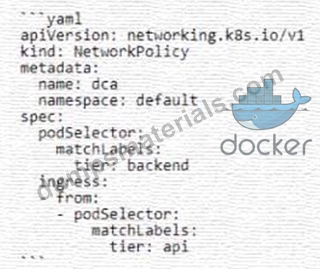
Will the networkPolicy BLOCK this traffic?
Solution: a request issued from a pod lacking the tier: api label, to a pod bearing the tier: backend label
- A. No
- B. Yes
Answer: B
Explanation:
Explanation
The networkPolicy shown in the image is designed to block traffic from pods lacking the tier: api label, to pods bearing the tier: backend label. This is because the policy is set to matchLabels: tier: backend, and the ingress is set to - from: podSelector: matchLabels: tier: api. Therefore, any traffic that does not match these labels will be blocked.
References:
* Isolate containers with a user namespace | Docker Docs
* The mnt namespace - Docker Cookbook - Second Edition
* Container security fundamentals part 2: Isolation & namespaces
I hope this helps you understand the concept of networkPolicy and how it works with Kubernetes. If you have any other questions related to Docker, please feel free to ask me.
NEW QUESTION # 68
......
Docker Certified Associate (DCA) certification exam is a popular certification for IT professionals who work with Docker container technology. Docker is a popular platform for building, shipping, and running distributed applications. The DCA certification is designed to validate the skills and knowledge of an individual in Docker container technology. DCA exam measures the knowledge of the candidates in various areas such as Docker architecture, installation and configuration, Docker networking, security, and troubleshooting.
Actual Questions Answers Pass With Real DCA Exam Dumps: https://www.dumpsmaterials.com/DCA-real-torrent.html
Pass Your Exam Easily! DCA Real Question Answers Updated: https://drive.google.com/open?id=1sMRtYe_YGaw0HMkua6TxgNA4DFgXiz6q
